This Power BI feature is a game changer. As a developer, publishing and keeping track that the version in the different workspaces, was always a headache. Whenever there isn’t a systematic way to keep track of versioning, making mistakes becomes really easy. Enter deployment Pipelines!
Power BI Deployments Pipelines was released back in May 2020. It has been around for over a year and the functionality keeps improving. Even though it has some important limitations that we’ll discuss later, I think this is a great step forward.
The good stuff
First advantage, the pipelines provide a clear path for moving reports and the related datasets for Development to Test to Production workspaces with just the click of one button. When setting up the deployment, we can configure parameter rules to set specific values for the connection details for development, test, and production stages.
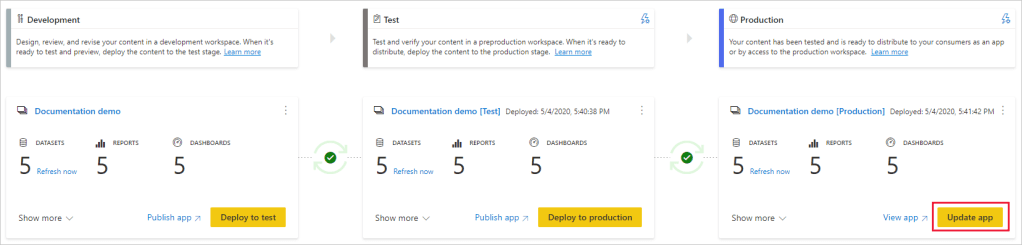
The second advantage is allowing a better way to manage the prototyping and testing of new versions of your reports by maintaining separate Power BI workspaces and enabling the developer to see what has change in the different environments and allowing end users to be completely unaffected by development and testing cycles.
Third advantage, is meta data deployment. Using this method, we don’t have to overwrite the dataset which would need a full refresh. This makes deploying small changes a lot faster and easy.
The following item properties are not copied during deployment:
- Data – Data isn’t being copied, only metadata is copied
- URL
- ID
- Permissions – For a workspace or a specific item
- Workspace settings – Each stage has its own workspace
- App content and settings
The following dataset properties are also not copied during deployment:
- Role assignment
- Refresh schedule
- Data source credentials
- Query caching settings (can be inherited from the capacity)
- Endorsement settings
Forth advantage is the user-friendly interface to visualise and manage changes between workspace.
Fifth advantage, permissions to access workspaces are separated from the permissions for the deployment pipelines. This way you can have users that have access to make changes in the workspaces but can deploy set changes between workspaces.
Sixth advantage, 2 supported dataset features that can enhance the use of the deployment pipelines: Incremental refresh and composite models
List of items that hat can be deployed:
- Datasets
- Reports
- Dashboards
- Paginated reports
Limitations
This process does not replace any local source control methods for the PBIX files. The major limitation with this is that there is no easy roll-back scenario that can be executed.
Downloading a PBIX file after deployment isn’t supported.
The deployment pipelines are only available for Power BI Premium.
We can’t use the deployment pipelines to deploy dataflows.
Another limitation, might not apply for a lot of people, is if you have your datasets in different workspace from the reports, there is no way to set up variable that allow the deployment pipeline to pick up the right dataset.
The maximum number of Power BI items that can be deployed in a single deployment is 300.
Datasets that use real-time data connectivity cannot be deployed.
Deployment pipelines doesn’t support the following items:
- Datasets that do not originate from a PBIX
- PUSH datasets
- Dataflows
- Reports based on unsupported datasets
- Template app workspaces
- Workbooks
- Goals
 Tidemark @ RisingTide.Tech